01
Press to assign
Choose an action, then move the axis, press the button or push the hat on any device. Flight Control listens to all of them at once and ignores jittery axes.
HOTAS Flight Control · Experimental branch
This is a very experimental branch of Flight Control 1.2.0 with a HOTAS tab: scan your joystick, throttle and pedals, assign them by using them, and run the command wheels from the stick.
You are helping define it. It is published so people can try it and say what the HOTAS side should do, before it is merged into the main Flight Control support. What your hardware does, and what you would change, is exactly what is needed.
Download the HOTAS buildWatch the videoRead the guide
Experimental, and a separate download. It is not part of the regular Flight Control release and may change a lot, or be merged only in part, depending on what testers find.
Fate of the Galaxy 2.0.2 only. This HOTAS adapter does not support Fate of the Galaxy 1.1.3 or earlier. For those, use the regular gamepad release.
It backs up your pilot and settings before every change, and Restore backup puts them back.
Video · about 4 minutes
A walk through the HOTAS tab, from the first scan to sharing your profile. The video loads from YouTube only when you press play, so this page makes no YouTube request until then. Narration is an AI voice.
What it does
The HOTAS tab finds every joystick, throttle and pedal set the game can see and lets you assign them by using them. It works across several devices at once, and the command wheels work from them too.
01
Choose an action, then move the axis, press the button or push the hat on any device. Flight Control listens to all of them at once and ignores jittery axes.
02
Stick, throttle, pedals, button box. Game controls can use up to four devices, and wheel controls as many as you have. A gamepad can stay connected alongside.
03
Flying, weapons, targeting, throttle, energy, views and squad commands go straight to the game. The command wheels, menus and gamepad-style buttons run through Flight Control, with their tap and hold actions.
04
Put fire and wheel select on the same button: it fires in flight and confirms inside a wheel. Good for a stick with few buttons.
05
Turn a rotary encoder to step round a command wheel one entry at a time, then press to select. Two ordinary buttons work too.
06
Live bars, buttons and hats you can drag into place, with an optional photo of your own device behind them.
07
Gamepad mode removes the HOTAS bindings and restores how the game was set up before. Your HOTAS profile is kept for next time.
08
See each flying axis live, measure it and tune its dead zone, curve and range. Precision mode (experimental) applies it per axis, which the game itself cannot do.
09
Everything is backed up before Apply, with a one-click restore. Shared profiles carry no serial numbers and no file paths from your PC.
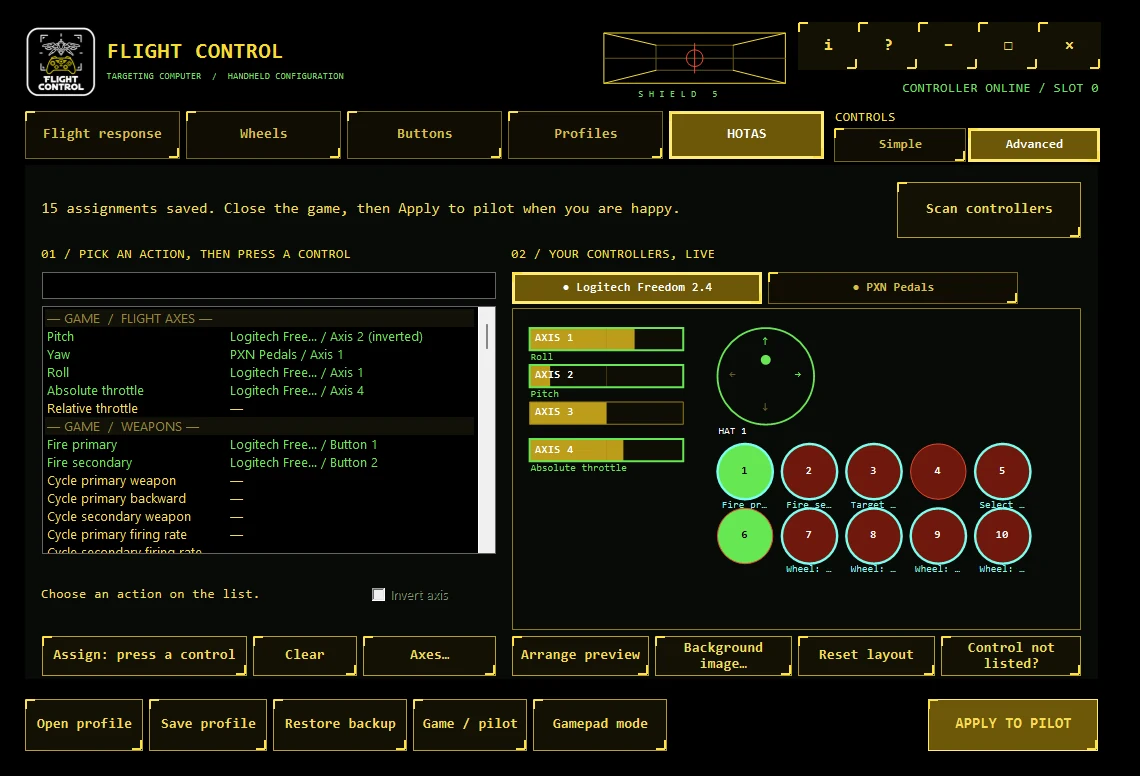
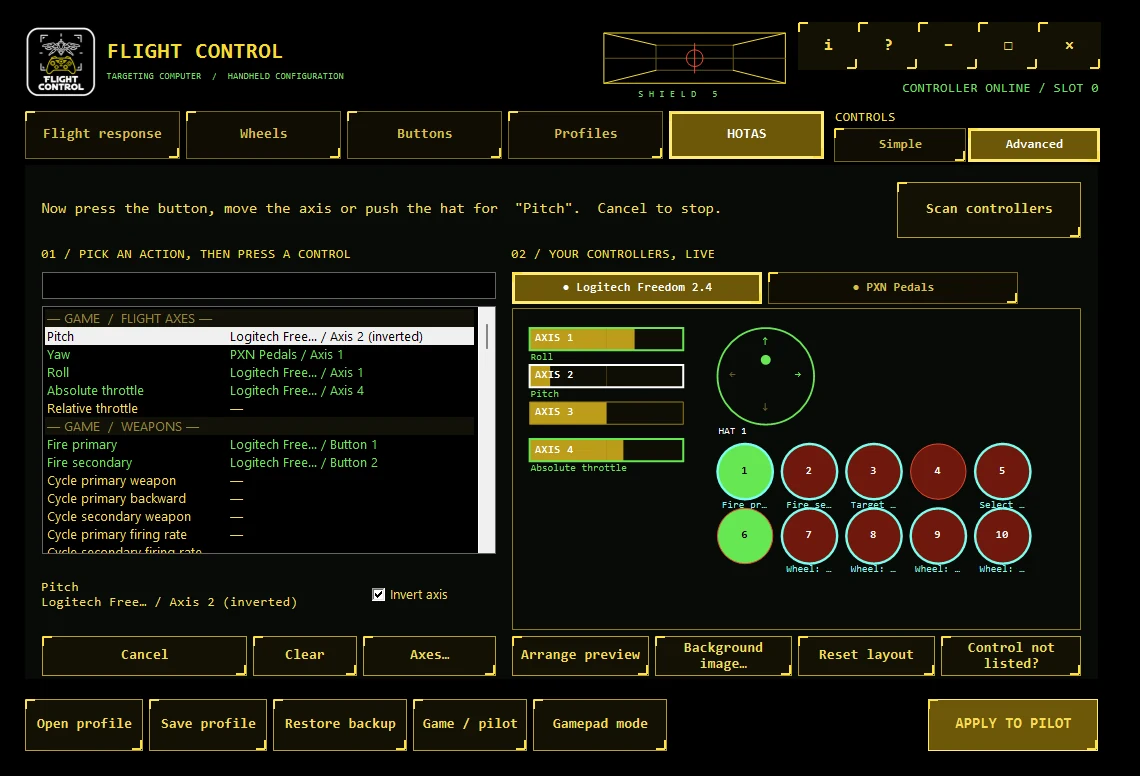
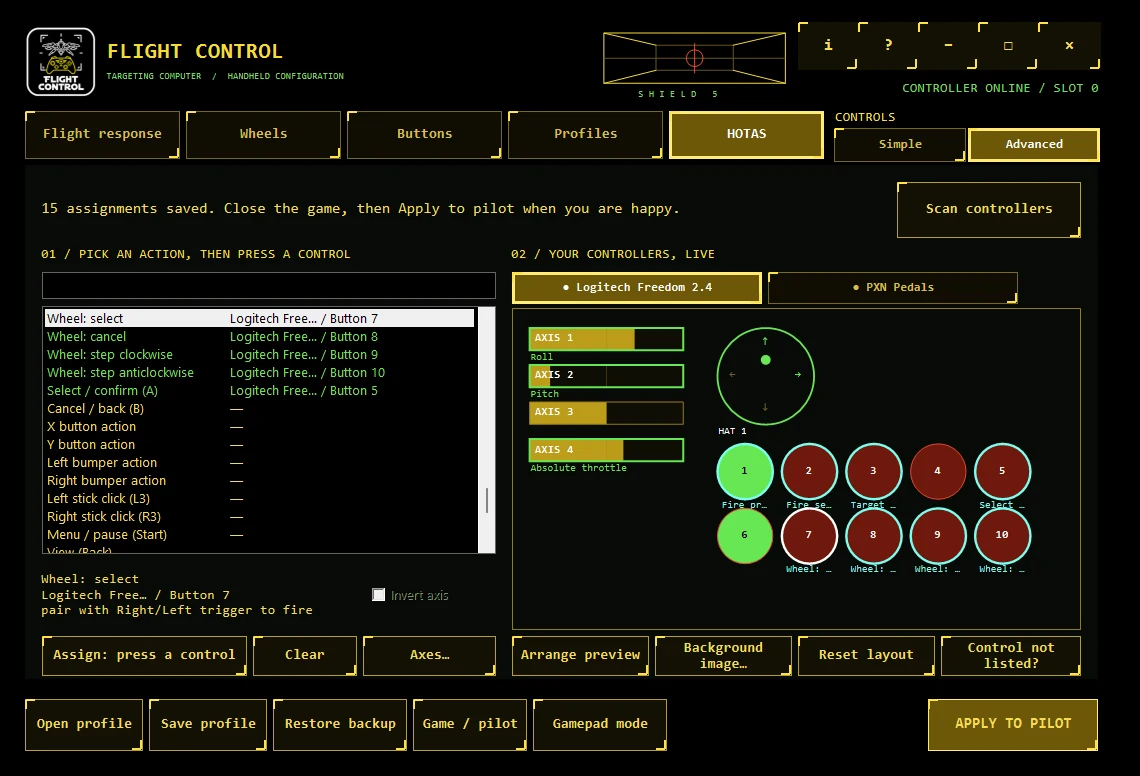
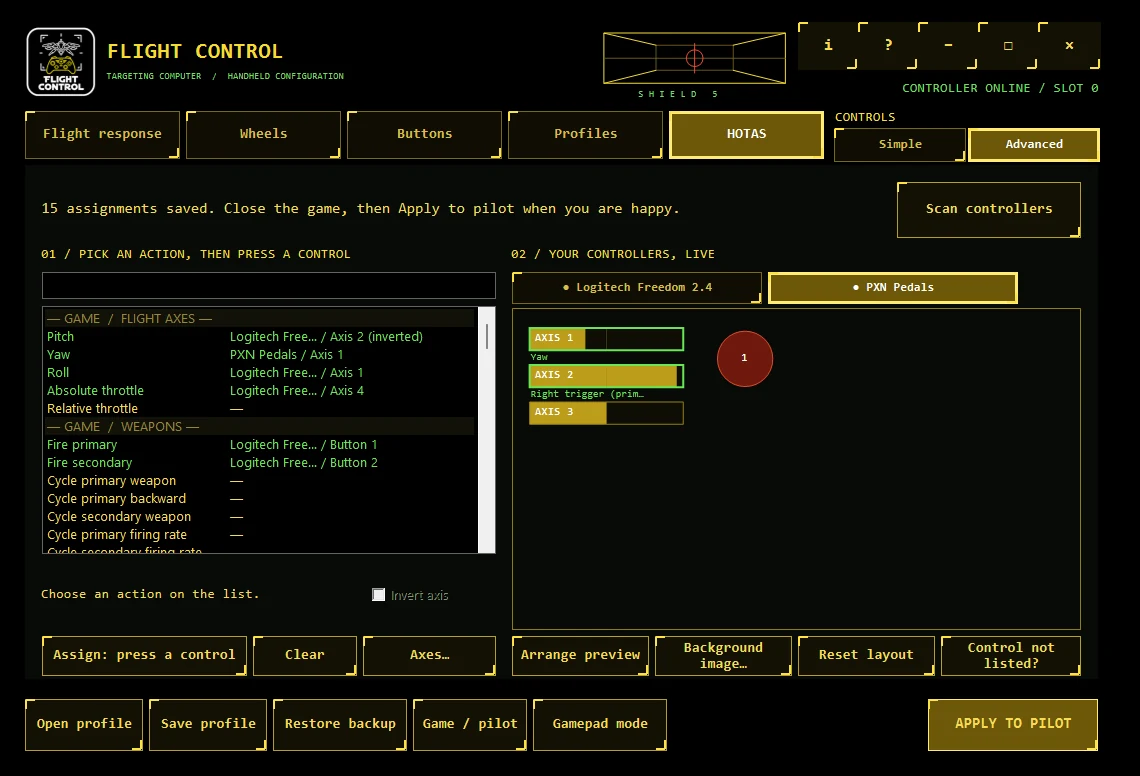
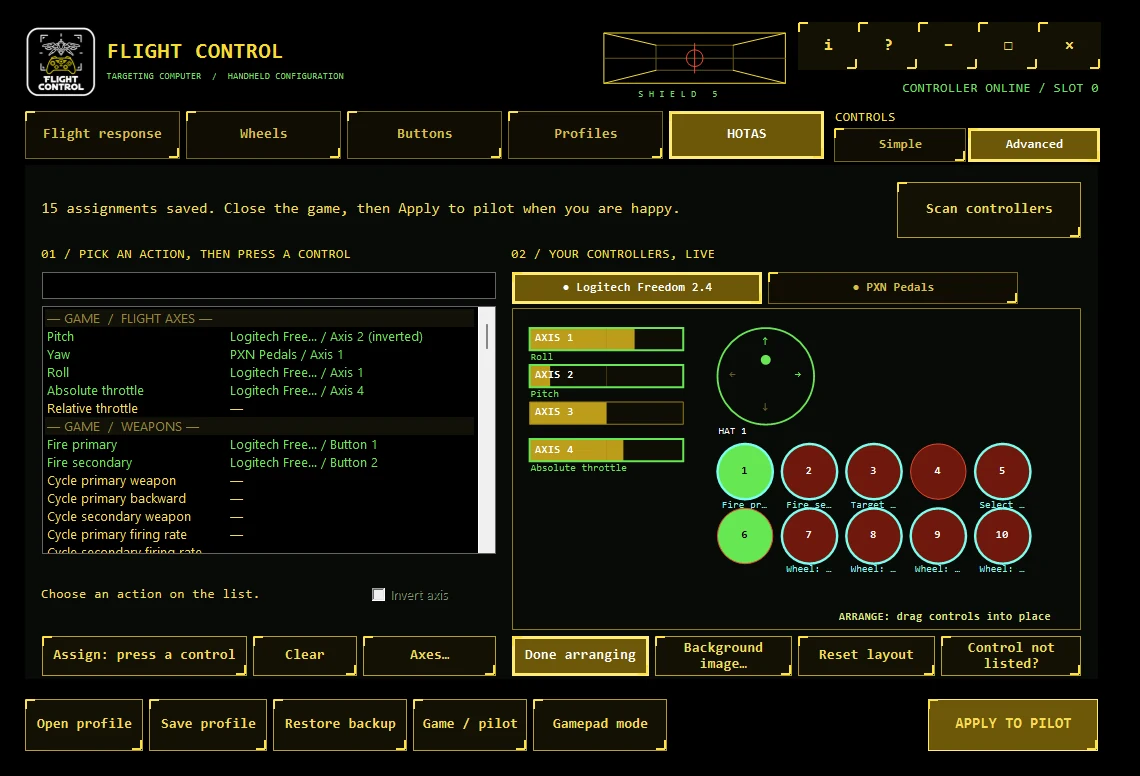
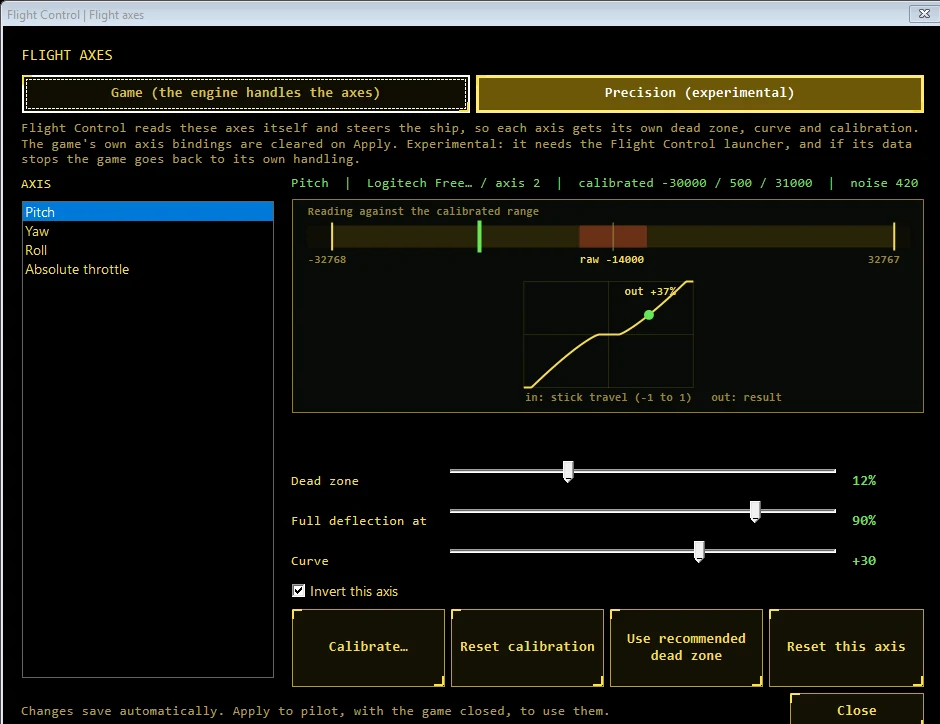
Close the game, then press Apply to pilot. Your pilot, settings and control table are backed up first.
Start the game with the Flight Control launcher. To go back to the gamepad, press Gamepad mode; Restore backup undoes the last Apply.
Why it is experimental
HOTAS support lives on its own branch on purpose. Real HOTAS setups are very different from each other, and I would rather learn what people need than guess. Your reports decide what gets polished, what changes, and what is merged into the main Flight Control support.
Install it on Fate of the Galaxy 2.0.2, assign your devices and fly. It is a separate download, and the regular release is untouched.
Which hardware you used, which actions worked, which did not, and what you would change. A saved .fchotas profile carries no serial numbers or file paths, so it is safe to attach to a report: [email protected].
Once the behaviour has settled, the HOTAS support is merged into the main release. Until then, expect changes and rough edges.
Tested so far
Fate of the Galaxy 1.1.3 and earlier. The HOTAS adapter needs the game's SDL3 engine and the Flight Control MyMod control table from Fate of the Galaxy 2.x. At the moment it works only with 2.0.2. If you try it on a 1.1.x install, the HOTAS tab asks you to install Flight Control for FotG 2 first and changes nothing.
Download
Free · Windows 10 or 11 · Fate of the Galaxy 2.0.2 only for HOTAS. It includes everything in the regular 1.2.0 release.
Separate from the regular download. For Fate of the Galaxy 2.0.2.
Experimental. Tell me how it goes: [email protected]. The regular gamepad release is on the Flight Control page.
Optional · for other hardware
If you would rather not install the experimental build, or your device behaves oddly, the small profiler tool can scan it and share an anonymous hardware profile. That is how support for more devices gets built.
A single small EXE. Uses the .NET Framework that already ships with Windows.
Documents\Flight Control HOTAS Profiler so you can inspect it.Early build. It has been tried with a gamepad; HOTAS devices are exactly what's still needed. If it misbehaves with yours, that's useful to know: [email protected].
At the end of the scan there's an unticked box: "I'd like to apply for the physical HOTAS testing beta." Tick it and the tool asks for an email address, used only to contact you about testing. It's stored separately from your hardware profile and is never published. Applying is optional, doesn't guarantee an invitation, and you never need it to share a profile.
What is and isn't shared
The hardware profile contains no machine identifier and nothing that identifies you. The only personal data the project ever handles is the email address of someone who volunteers for the beta, and that stays separate.
Profiles are reviewed before use, kept for at most one year, and may be published as a public hardware library under CC0 once approved. Read the full privacy notice.
FAQ
Fate of the Galaxy 2.0.2 through Flight Control. Fate of the Galaxy 1.1.3 and earlier are not supported by the HOTAS adapter. They keep working with the regular gamepad release.
HOTAS setups vary a lot, and this build has been tried on very little hardware. It lives on its own branch so testers can help define how the HOTAS support should work, and so the regular release stays stable. Once the behaviour has settled, it is merged into the main support.
Any joystick, throttle, pedals or button box that the game's own engine can see. If the game cannot see a control, Flight Control cannot either, and the Console tells you.
Yes. Flight Control actions can run from both at once, and Gamepad mode switches the game's own bindings back in one click.
Yes. Bind one button to the right trigger and to Wheel select. In flight it fires, in a wheel it confirms and does not fire.
Apply backs up the pilot, the game's settings and the control table first, and Restore backup puts them back. Applying only wheel actions never touches your gamepad's flight setup.
Yes. Save profile writes a .fchotas file with no serial numbers and no paths. Someone with a different device can pick one of theirs to take its place.
In Precision mode (experimental), yes: each flying axis has its own dead zone, curve and calibration. In the game's own mode there is one dead zone for every axis, and the axes dialog can measure your axes and set it.
No. The profiler is optional and separate. It only reads your controllers, installs nothing and doesn't touch the game.
The code is open source and the downloads are checked against their SHA-256. The programs are not code-signed yet.
Comments welcome
Ideas, suggestions, hardware you'd like covered, things that went wrong, privacy questions: all welcome. Comments from people who actually fly with a HOTAS are especially valuable, because I can't.